Objectives and progress
An objective is one piece of work inside a quest: “collect 3 herbs”. Gameplay code does not know the quests. It reports what happened as a quest event, and the objective counts the events it cares about. In this lesson a herb reports that it was picked up, and a quest objective counts it.
This lesson continues with the quest of Your first quest.
Create the objective
In the Content Browser choose Add > Blueprint Class, open All Classes, search for Pulse Quest Objective Gameplay Event and pick it. Name the Blueprint BP_CollectHerbs. It counts quest events without any graph. Why: Ready-made objectives.
Set what it counts
Open BP_CollectHerbs and set these in the Class Defaults:
| Property | Value |
|---|---|
| Event Tag | Quest.Event.HerbPicked (add the tag if it does not exist) |
| Target Progress | 3 |
| Display Text | Collect {Progress}/{Target} herbs |
{Progress} and {Target} are filled in by the objective, so the same text works in every UI. Compile and save.
Use it in the StateTree
Open ST_FirstQuest. Add a state Collect herbs after Reach the spot, add the task Quest Objective and set its Objective Class to BP_CollectHerbs. Change the transition of Reach the spot to On State Succeeded → Collect herbs, and give Collect herbs a transition On State Succeeded → Tree Succeeded. Compile.
You do not need a save id: the task generates one from the state and the objective class.
Make a herb
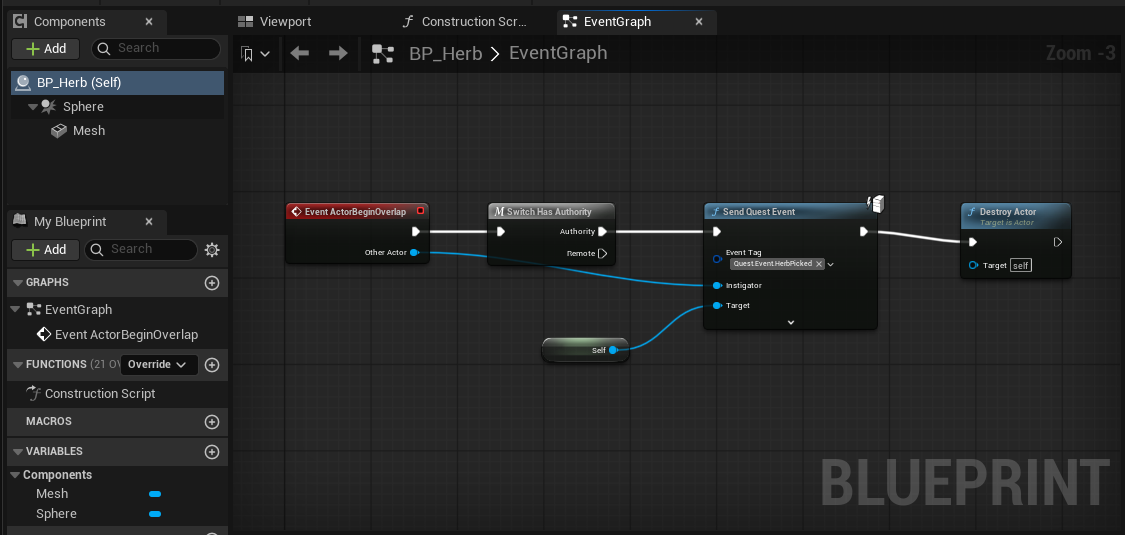
Create an Actor Blueprint BP_Herb with a Sphere Collision as the root and a mesh inside it. In the Event Graph:
- Add Event ActorBeginOverlap.
- Add Switch Has Authority and continue on Authority, because events are only handled on the authority.
- Add Send Quest Event with Event Tag
Quest.Event.HerbPicked, Instigator = Other Actor and Target = Self. - Add Destroy Actor.
The instigator tells the quest manager whose event this is: an event counts for the manager of the player that caused it. Why: Gameplay events.
Place the herbs
Drag three or more BP_Herb actors into your level, away from the spot of the first objective.
Play and pick them up
Press Play and turn on Pulse.Quest.ShowEvents 1. If the quest does not start with the level, type PulseQuestStart Quest.Tutorial.FirstQuest. Complete the first objective (walk to the spot, or type PulseQuestComplete), then walk through the herbs. Each herb adds one to the progress.
No herbs at hand? PulseQuestEvent Quest.Event.HerbPicked sends the same event from the console, and PulseQuestProgress adds progress to the running objectives.
Watch the progress
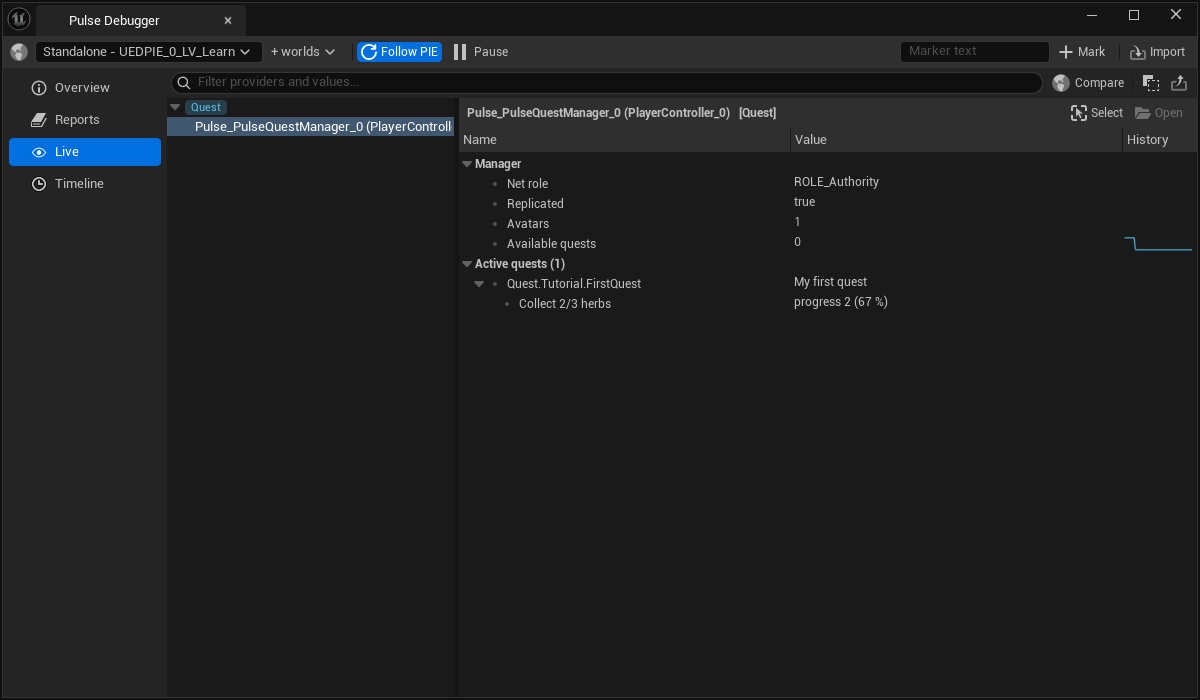
Open Tools > Debug > Pulse Debugger and the Live page. The objective is listed under the quest with its text, for example Collect 2/3 herbs, and its progress in percent. When the third herb is picked up, the objective completes and the quest finishes.
Result
An objective counts herbs and shows its progress, and the quest finishes when all three are collected.
Next: Branching with the StateTree, or Show quests in the UI to show the progress to the player.