Branching with the StateTree
A story flag is a gameplay tag the quest manager remembers: “helped the villager”, “knows the secret passage”. A StateTree can read it with a condition and take a different transition. In this lesson the quest has two endings, and a flag decides which one you get.
This lesson continues with the quest of Objectives and progress.
Add the flag
Add the gameplay tag Story.HelpedVillager in Project Settings > Project > Gameplay Tags. Use one root such as Story. for all story flags.
Add two ending states
Open ST_FirstQuest. Add two states after Collect herbs, named Good ending and Plain ending. Give each the task Quest Objective with the Objective Class Timer Objective, and set its Display Text: The villager thanks you for the good ending and Nobody notices for the plain one. Give both a transition On State Succeeded → Tree Succeeded.
The display text makes the ending visible in the debugger. Why: Objectives.
Branch on the flag
Select Collect herbs and replace its transition by two transitions, in this order:
- On State Succeeded →
Good ending, with the condition Has Story Flag. Open Query and choose Any Tags Match with the tagStory.HelpedVillager. - On State Succeeded →
Plain ending, without a condition.
A StateTree takes the first transition whose condition passes, so the plain ending is the fallback. Compile. Why: Conditions.
Set the flag from Blueprint
In the Level Blueprint add Keyboard H. From it, add Get Player Controller, Find Quest Manager (Actor = the controller) and Set Story Flag with the flag Story.HelpedVillager.
Flags are replicated and saved with the quest manager. Only the authority sets them. Why: Story flags.
Take the plain ending
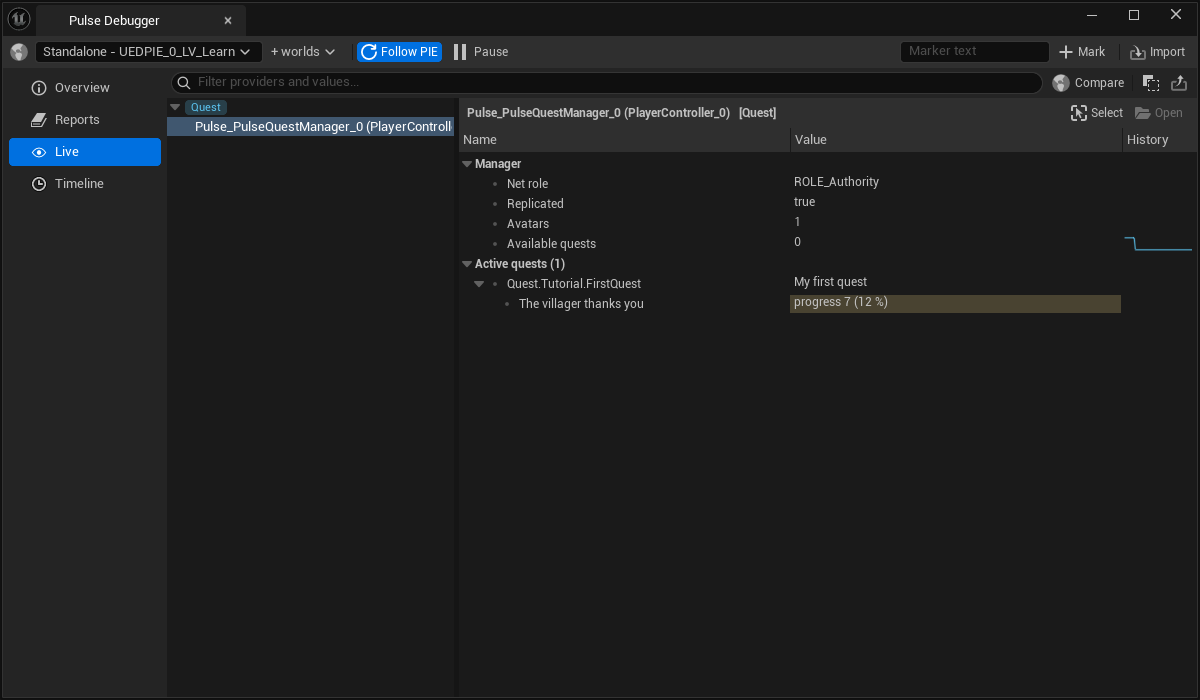
Press Play and play the quest to the end without pressing H. When the herbs are collected, the objective of the Live page of the Pulse Debugger reads Nobody notices.
Take the good ending
Stop and play again. This time press H before you finish the herbs, or type PulseQuestFlag Story.HelpedVillager 1 in the console. The objective now reads The villager thanks you.
Result
The quest takes one of two endings, depending on a flag your game sets.
The condition Quest Finished branches on earlier quests the same way. Next: Save and load quests.