Write an objective in C++
The objectives that come with Pulse Quest cover many quests. When you need your own rule, you write a class. In this lesson you build Stand Still: the objective is done when the player stood still for five seconds.
This lesson continues with the quest of Your first quest. You need a C++ project.
Let your module use Pulse Quest
Open the Build.cs of your game module and add PulseQuest to the public dependencies. GameplayTags is needed too, because the objective functions take gameplay tags.
Declare the class
Add the header MyStandStillObjective.h to your module. The class derives from UPulseQuestObjective and is Blueprintable, so designers can also make Blueprint children of it. Seconds and MaxSpeed are the settings of the objective, StillTime is the state.
StillTime has SaveGame, so the objective is saved with the quest and goes on after loading. PulseQuest saves the progress itself; an own state struct (MakeCustomState, SetCustomState) is the other way to save what an objective counts. Why: Objectives.
Tick on the server
The quest runs on the server, so the rule goes there. In MyStandStillObjective.cpp:
- The constructor sets
bWantsTick. Without it,Tickis never called. InitObjectivesets the target progress to the number of seconds.Tickreturns on clients (HasAuthority). It asks GetQuestAvatars for the characters of the quest manager and counts the time while all of them stand still.SetProgressreaches the target, and the objective completes by itself, because Complete On Target Progress is on by default.
Close the editor and build the project, then open it again. Live Coding cannot add a new class.
Use it in the StateTree
Open ST_FirstQuest. On the state with the Quest Objective task, change the Objective Class to Stand Still Objective. Set Seconds to 5 and the Display Text to Stand still: {Progress}/{Target}. Compile.
Your class is in the class picker because it derives from the objective base class, like the ones of the plugin.
Play
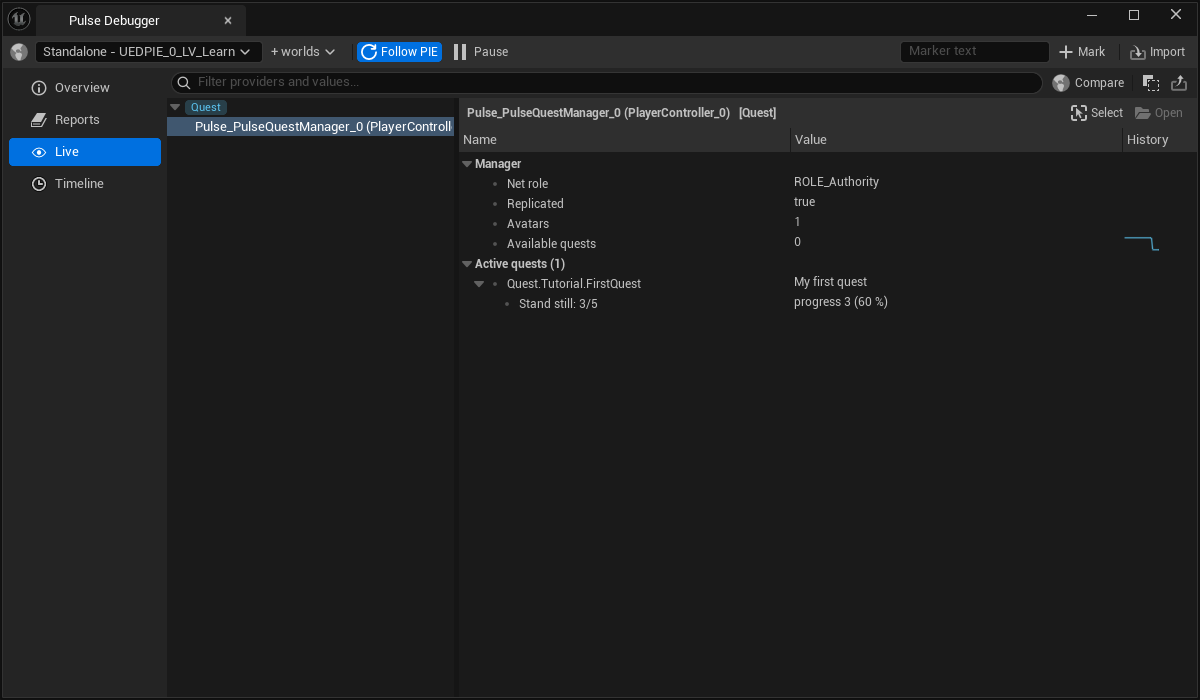
Press Play and open the Live page of the Pulse Debugger. While you run around, the progress of the objective stays at 0. Stop moving: it counts up to 5 and the quest finishes.
Result
You wrote a rule in C++ and the quest uses it like any other objective.
Where to go next: the objective can also react to events when you set bListenForQuestEvents, and the C++ API reference lists everything an objective can call.