Debugging
Pulse Water describes itself to the Pulse Debugger of Pulse Foundation (Tools > Debug > Pulse Debugger): its own page Water puts the worlds of a Play in Editor session side by side, the Live page shows the state of the water, the boats and the floating objects, and the Timeline page shows what happened when (source Water).
Water page
Open it from the debugger window or with Pulse.Debugger PulseWater.Water; the Test step of the Pulse window opens it, too. The page compares the server and every client at the water time of the server, so problems that only show in multiplayer turn up before a tester reports them. Without Play in Editor it shows the water of the level editor.
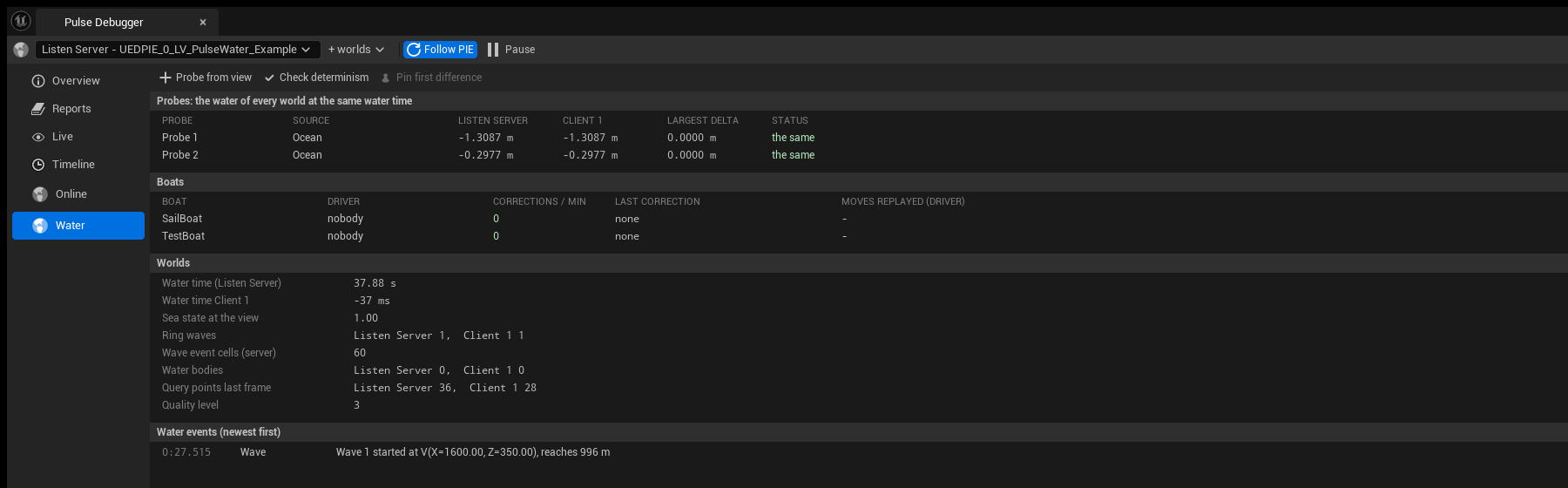
- Probes: the probes pinned in the Pulse Water mode, with the water of the server and of every client, the largest height difference and a status. A row turns red when a client differs: not loaded, no water, water only on the client, another source (ocean, lake, river) or another height (more than 1 cm). Probe from view pins a probe where the camera of the session (else of the level editor) looks at the water.
- Check determinism queries 48 x 48 points, 4 m apart, around the view in every world at the same water time and counts where clients differ, and why: “2304 points in 2 worlds at water time 86.97 s: 2275 the same, 29 differ. Client 1: water only here (29).” Pin first difference pins a probe there, so the PIE windows show it with the value of the server next to theirs.
- Boats: every boat of the server with its driver, the corrections the server sent in the last minute, size and age of the last correction, and the moves the driving client replayed. Corrections should stay at 0 (see Boats).
- Worlds: the water time of the server and how far every client is off, the sea state at the view, ring waves, wave event cells, water bodies and the points queried in the last frame of every world, the quality level.
- Water events: the latest events of the timeline with source
Water. Timeline (Water) opens the Timeline page on them.
The page button counts the probes that differ and the boats corrected in the last minute.
Live page
The snapshot providers of Pulse Water have the category Water:
- the water subsystem: water time, render origin, quality level, the ocean (sea level, wave set, terrain cover), the environment and terrain providers, and how many water bodies, zones, exclusion volumes, ring waves, wave event cells and query points of the last frame there are;
- every boat: role, driver, speed, controls, unconfirmed moves, the corrections sent (server) or received (driving client), the moves replayed and the last correction;
- every hull: health, water inside, inflow, leaks (shown as red spheres), wrecked, sunk, capsized;
- every floating object (buoyancy): in the water, submerged, pontoons.
PulseDebugDump Water writes the same state to the log (Console).
Timeline
Events of the source Water:
| Category | When |
|---|---|
Wave | A ring wave starts (server), with where and how far it reaches. |
Hull | A hull takes damage, is wrecked or sinks. |
Correction | The server corrects the driving client of a boat (how far it was off), and the client applies it (how far it moved the boat, how many moves it replayed). |