Debugging
Cheats
Module PulseOnlineDebug adds cheats (UPulseCheatExtension of PulseFoundation). They act on the game instance of the player who runs them; enable cheats first (EnableCheats). In PIE, run them for an instance with Pulse.PIE.Exec <instance> <cheat>.
All cheats, the server console commands (Pulse.Online.Server.Admin, Pulse.Online.Server.Parameters) and the log categories are listed on Console. The console autocompletes them (Config/Input.ini of the plugin).
Pulse Debugger page “Online”
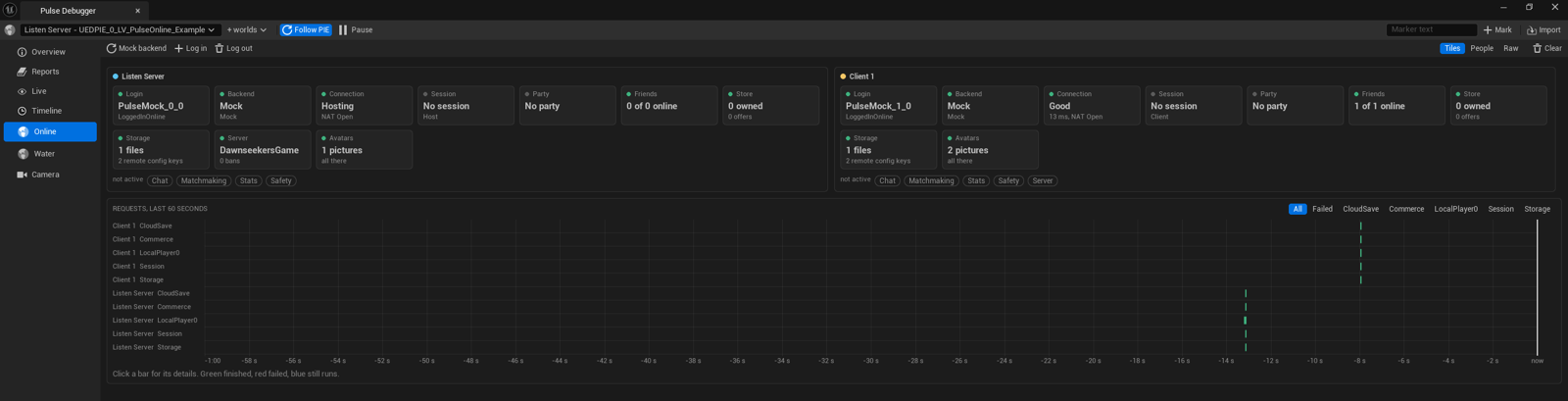
Tools > Debug > Pulse Debugger (or the console command Pulse.Debugger PulseOnline.Online) has a page Online (module PulseOnlineDebugger, a developer tool: also in games started from the editor and in Debug and Development builds, where Pulse.Debugger PulseOnline.Online opens it). It is built to be seen rather than read:
- Problems on top: requests that failed in the last minute (with their error) and warning or error values, each with a link to the place.
- Tiles: one tile per area (login, backend, connection, session, party, friends, chat, matchmaking, store, storage, stats, safety, server, avatars) with a light, a big value and a line below, in a column per running world, so server and clients stand side by side. Areas nothing happens in shrink to grey chips. Click a tile to open the area: its people as cards, its values as chips and only its requests.
- Waterfall: every request of the last 60 seconds as a bar on the lane of its queue (green finished, red failed, blue still runs), filtered by queue or to failed ones; a click shows its text and duration.
- People: everyone the worlds know (local users, party members, friends, invites, players with their party) as one card per person, with the places they were seen.
- Raw: all values as a name/value tree and the requests as a table, as before. To watch a value (pinned on the Live page and the Overview), open its provider on the Live page and choose Watch there.
- Buttons: switch the game instance to the Mock backend, log the first local player in or out, clear the requests.
The tiles come from the summaries of the snapshots (FPulseDebugSnapshot::SetSummary), the people from person rows (AddPerson); see Debugging in the PulseFoundation docs. Idle request queues add nothing to the snapshots.
On the Timeline page, requests are bars on the lane Online (one span per request, from start to result), so you see how long a login or session search took next to the other plugins’ events. Merge the client world (+ worlds) to see both sides of a join.
Snapshots, timeline and messages
- The session, party, stats, matchmaking, connection, server, safety and chat subsystems are snapshot providers of PulseFoundation: the Pulse Debugger window, the gameplay debugger category Pulse and
PulseDebugDumpshow their state. - Every request is a span in the debug timeline (begin when the queue starts it, end with the result) and broadcasts
Pulse.Message.Online.RequestCompleted(payloadFPulseOnlineRequestMessage). - Login changes are broadcast as
Pulse.Message.Online.User.LoginStateChanged, read or written stats asPulse.Message.Online.Stats.Updated(payloadFPulseOnlineStatsMessage), rating changes asPulse.Message.Online.RatingChangedand ticket states asPulse.Message.Online.Matchmaking.StateChanged, connection changes asPulse.Message.Online.Connection.Changedserver messages asPulse.Message.Online.Server.Message, chat messages asPulse.Message.Online.Chat.Received, block list changes asPulse.Message.Online.Safety.BlockListChanged, reports asPulse.Message.Online.Safety.PlayerReportedand party changes of players in a game session asPulse.Message.Online.PlayerPartyChanged(payloadFPulseOnlinePlayerPartyMessage). Every channel is registered (Pulse.Messages.List); the context names the player (the local player controller, or the player state of another player), the source (the request, the user, the matchmaking queue) and an amount (1, or the count the channel describes). The list of all channels of all Pulse plugins is on the page “Message channels” of Pulse Foundation. - The party snapshot lists the parties of the players under “Player parties”: every player on the server, the own players on a client. The avatar snapshot (“Avatars”) counts cached pictures, running queries and users without a picture.
Logs
The log categories of PulseOnline, PulseOnlineEOS and the online bridges, and how to change their verbosity, are on Console.